Architecture Overview#
OSPREY deploys agentic AI in safety-critical control system environments — particle accelerators, fusion experiments, and beamlines. It uses the Osprey agent as the orchestrator, MCP servers as the tool interface, and pluggable connectors for protocol-agnostic hardware access.
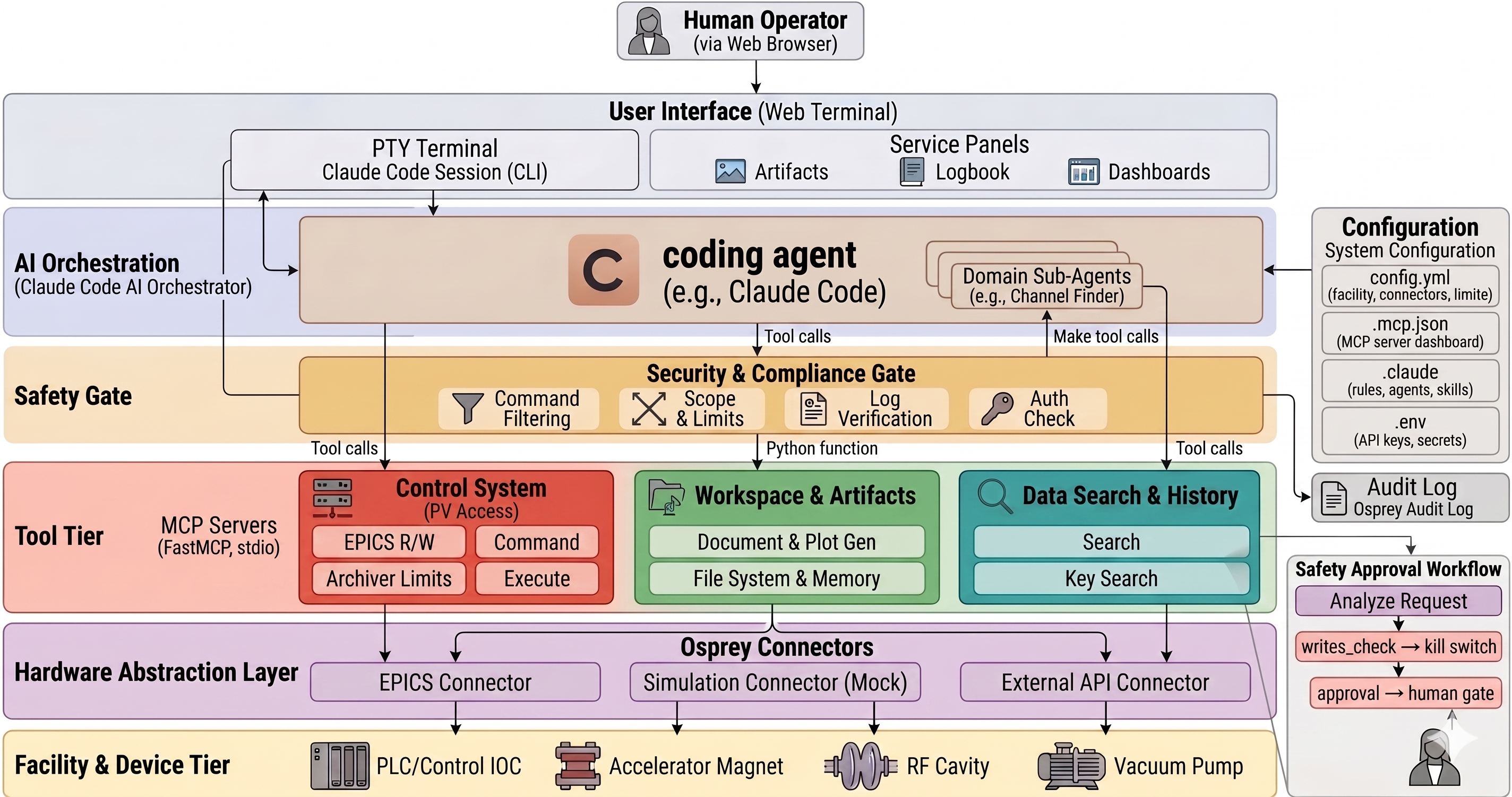
Osprey system architecture — from operator to facility, with the safety gate and approval workflow in-line.#
Safety Chain#
Every tool invocation passes through a configurable chain of PreToolUse hooks before reaching
the MCP server. The chain for channel_write — the most safety-critical tool — has three stages:
        flowchart LR
    CC["Osprey agent<br/>calls channel_write"] --> WC["writes_check<br/><i>kill switch</i>"]
    WC -->|enabled| LIM["limits<br/><i>min / max / step</i>"]
    LIM -->|valid| APR["approval<br/><i>human gate</i>"]
    APR -->|approved| MCP["MCP Server<br/>executes write"]
    WC -->|disabled| BLOCK["❌ Blocked"]
    LIM -->|invalid| BLOCK
    APR -->|rejected| BLOCK

    style WC fill:#e74c3c,stroke:#333,color:#fff
    style LIM fill:#e67e22,stroke:#333,color:#fff
    style APR fill:#f39c12,stroke:#333,color:#fff
    style BLOCK fill:#95a5a6,stroke:#333,color:#fff
osprey_writes_check — Kill switch. Blocks all writes when
control_system.writes_enabledisfalseinconfig.yml. Applies to bothchannel_writeandexecute.osprey_limits — Validates the setpoint against the channel limits database (min, max, step size, writable flag). Only applies to
channel_write.osprey_approval — Human approval gate. Per-tool policy dispatch:
always(require approval every time),selective(ask the Osprey agent to decide), orskip.
Data Flow#
A typical control system write follows this path. The three safety hooks fire between the Osprey agent and the MCP server:
        sequenceDiagram
    participant Op as Operator
    participant WT as Web Terminal
    participant CC as Osprey agent
    participant CF as Channel Finder Sub-Agent
    participant H as Safety Hooks
    participant CS as Control System MCP
    participant Conn as EPICS/Mock Connector

    Op->>WT: "Bump the horizontal corrector at sector 3 by 0.5 A"
    WT->>CC: Forward message

    Note over CC,CF: Channel address lookup via sub-agent
    activate CF
    CC->>CF: "horizontal corrector setpoint, sector 3"
    CF->>CF: Query Channel Finder DB
    CF-->>CC: SR03C:COR:H1:CURRENT
    deactivate CF

    Note over CC,CS: Read current value to compute target
    CC->>CS: channel_read("SR03C:COR:H1:CURRENT")
    CS->>Conn: read_channel()
    Conn-->>CS: ChannelValue(1.2)
    CS-->>CC: "Current value: 1.2 A"

    Note over CC,H: channel_write triggers hook chain
    CC->>H: PreToolUse: channel_write("SR03C:COR:H1:CURRENT", 1.7)
    H->>H: 1. writes_check → enabled
    H->>H: 2. limits → 1.7 within range
    H->>Op: 3. approval → "Write 1.7 A to SR03C:COR:H1:CURRENT?"
    Op->>H: Approve
    H->>CS: Proceed
    CS->>Conn: write_channel() [limits validated]
    Conn-->>CS: ChannelWriteResult(success=True)
    CS-->>CC: "Write confirmed, verified at 1.7 A"
    CC->>Op: "Done. Corrector SR03C:COR:H1 set to 1.7 A (+0.5 A)."
See also
- MCP Servers
Complete list of MCP servers and their tools.
- Add a Connector
How to add a custom control system connector.
- Container Deployment
How to create and deploy an OSPREY project.