Logbook Search Service (ARIEL)#
ARIEL (Agentic Retrieval Interface for Electronic Logbooks) provides intelligent
search over facility electronic logbooks. It is built around a modular
architecture with three main layers: a data ingestion pipeline that normalizes logbook entries from any facility into a common
PostgreSQL schema, composable search modules such as
keyword and semantic similarity matching (plus a raw read-only sql_query
MCP tool for structural queries the agent can run directly against the
database), and a web interface for interactive exploration. These components connect to the
rest of Osprey through the integration layer, where
the agent invokes ARIEL’s MCP tools as part of broader workflows.
Every layer is designed to be facility-agnostic and extensible. Ingestion adapters, search modules, and enhancement stages are all registerable — you can implement your own and plug them into the full pipeline without modifying ARIEL’s source code. Out of the box, adapters are included for the reference logbook formats listed on Data Ingestion, and search strategies range from fast keyword lookup to embedding-based semantic similarity, with multi-step reasoning over results delegated to the OSPREY agent layer.
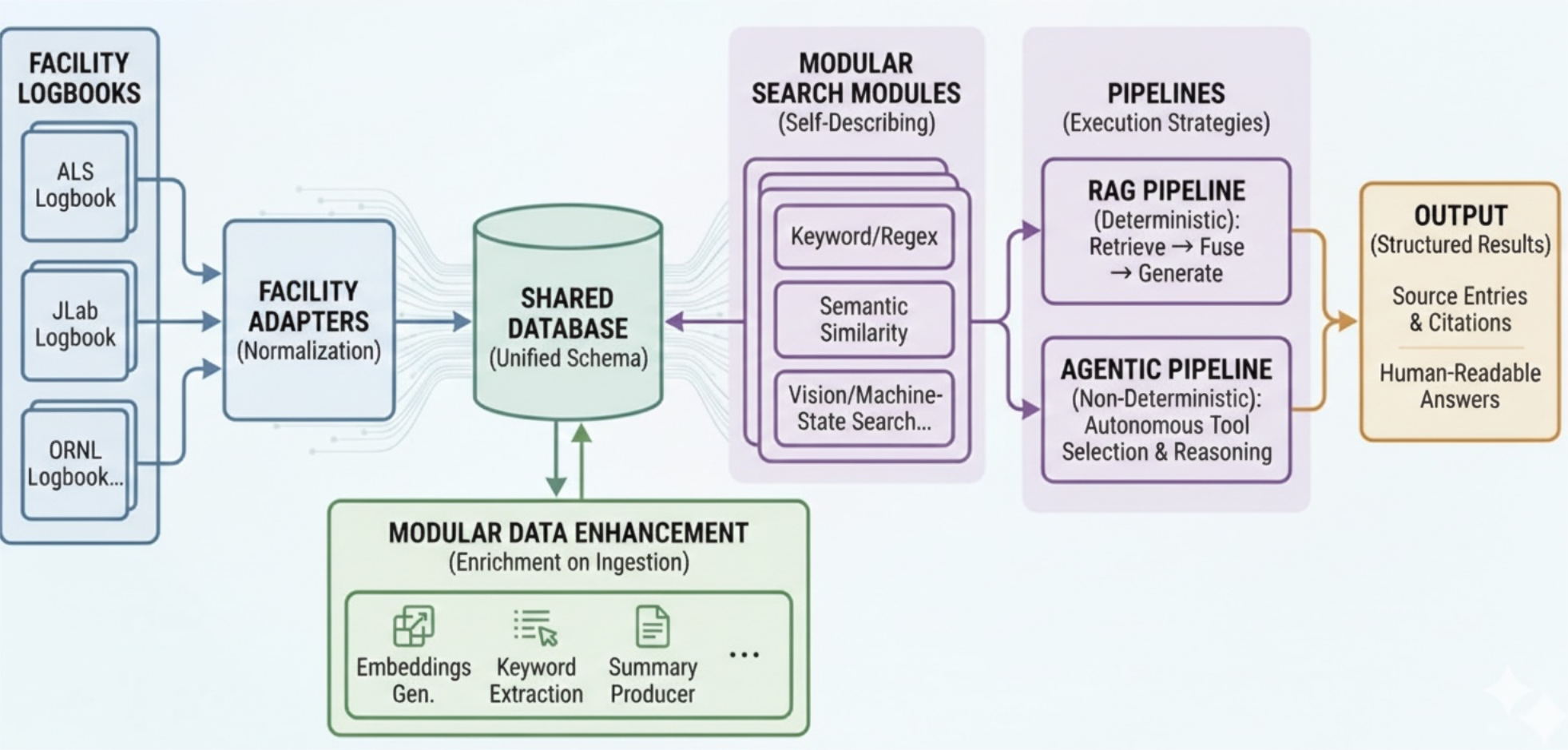
ARIEL data flow: facility logbooks are normalized through pluggable adapters into a shared PostgreSQL database, enhanced by modular processing stages, and queried through composable search modules.#
Prerequisites
ARIEL requires a working Osprey installation. Make sure you have the following ready before proceeding.
Python 3.11+ with a virtual environment
Osprey installed: see Installation
Container runtime: Docker Engine 20.10 or newer (Docker Desktop 4.0 or newer on macOS and Windows) or Podman 4.1 or newer (for PostgreSQL)
LLM API access: An API key for your configured provider (e.g.,
ANTHROPIC_API_KEY)(Recommended) Ollama — for local text embeddings powering semantic search:
brew install ollama
ollama serve &            # Start Ollama in the background
ollama pull nomic-embed-text
curl -fsSL https://ollama.com/install.sh | sh
ollama serve &            # Start Ollama in the background
ollama pull nomic-embed-text
Ollama is optional. Without it, semantic queries return a diagnostic and keyword search keeps answering. Semantic search also needs its embedding table, which
osprey ariel quickstartcreates (it needs the pgvector extension, which the deployed PostgreSQL image includes). A semantic search configured with no table is refused, and the refusal names this command.(Optional) Picture captions — a local vision model, also served by Ollama:
ollama pull qwen3-vl:4b
(Optional) Picture search — a site-run
llama-serverwith a multimodal embedding model; see Picture Captions and Picture Search.Both are optional. Like semantic search without Ollama, ARIEL degrades gracefully: without the caption model or without
llama-serverthe module is skipped,osprey ariel statussays why, and search keeps working on text.
Quick Start
The easiest way to get started is to create a new project from the
demo template, which includes ARIEL pre-configured
and ships the logbook login on a shared card:
osprey init my-project --preset demo
cd my-project
Its build gives you a ready-to-use config.yml
with PostgreSQL, the ARIEL web interface, and all search modules
enabled — skip to Step 2. The repository’s profile.yml is what
the build reads, and its .env is where your provider keys belong.
Three commands bring everything up. The first run pulls container images, so it may take a few minutes depending on your internet connection.
osprey build renders config.yml and the Docker Compose files
from profile.yml into build/. osprey up then pulls the
container images and starts what the build rendered, in the
background. It re-renders nothing, so run osprey build again after
you edit profile.yml:
osprey build
osprey up -d
osprey up creates the schema and seeds the demo logbook. Then
generate its embeddings (and picture captions, where a vision model
answers):
osprey ariel quickstart
Three ways to query the logbook:
Start the web terminal and open the ARIEL panel.
osprey web
Query the logbook service directly from the command line.
osprey ariel search "What happened with the RF cavity?"
Ask the OSPREY agent. The logbook-search MCP tools connect the agent to the ARIEL search service, so it can combine logbook results with other context.
osprey chat
>>> What does the logbook say about the last RF cavity trip?
Learn More#
Facility adapters, enhancement pipeline, and database schema.
Keyword and semantic search modules and how to add your own.
MCP tools, service factory, and search result structure.
FastAPI app, frontend architecture, capabilities API, and REST endpoints.
qmd)The container behind the hybrid search mode: configuration, corpus
mounts, disk footprint, and where it listens.
Captions and picture search over attachments: the site’s llama-server, measured values, and upgrade notes.
CLI Commands#
All ARIEL functionality is available through the osprey ariel command group:
Command |
Description |
|---|---|
|
Re-export logbook entries the markdown mirror never saw |
|
Quick setup: check the database, migrate, load the demo logbook, and enhance it |
|
Show ARIEL service status |
|
Search the logbook ( |
|
Attachment copy commands ( |
|
Ingest logbook entries from a source file or URL |
|
Run ARIEL database migrations |
|
Sync database: migrate, incremental ingest, and enhance |
|
Validate a facility vocabulary file |
|
Watch a source for new logbook entries |
|
Run enhancement modules on entries |
|
List embedding models and their tables |
|
Re-embed entries with a new or existing model |
|
Purge all ARIEL data from the database |