Logbook Search Service (ARIEL)#
ARIEL (Agentic Retrieval Interface for Electronic Logbooks) provides intelligent
search over facility electronic logbooks. It is built around a modular
architecture with three main layers: a data ingestion pipeline that normalizes logbook entries from any facility into a common
PostgreSQL schema, composable search modules such as
keyword and semantic similarity matching (plus a raw read-only sql_query
MCP tool for structural queries the agent can run directly against the
database), and a web interface for interactive exploration. These components connect to the
rest of Osprey through the integration layer, where
the agent invokes ARIEL’s MCP tools as part of broader workflows.
Every layer is designed to be facility-agnostic and extensible. Ingestion adapters, search modules, and enhancement stages are all registerable — you can implement your own and plug them into the full pipeline without modifying ARIEL’s source code. Out of the box, adapters are included for facilities such as ALS, JLab, and ORNL, and search strategies range from fast keyword lookup to embedding-based semantic similarity, with multi-step reasoning over results delegated to the Osprey agent layer.
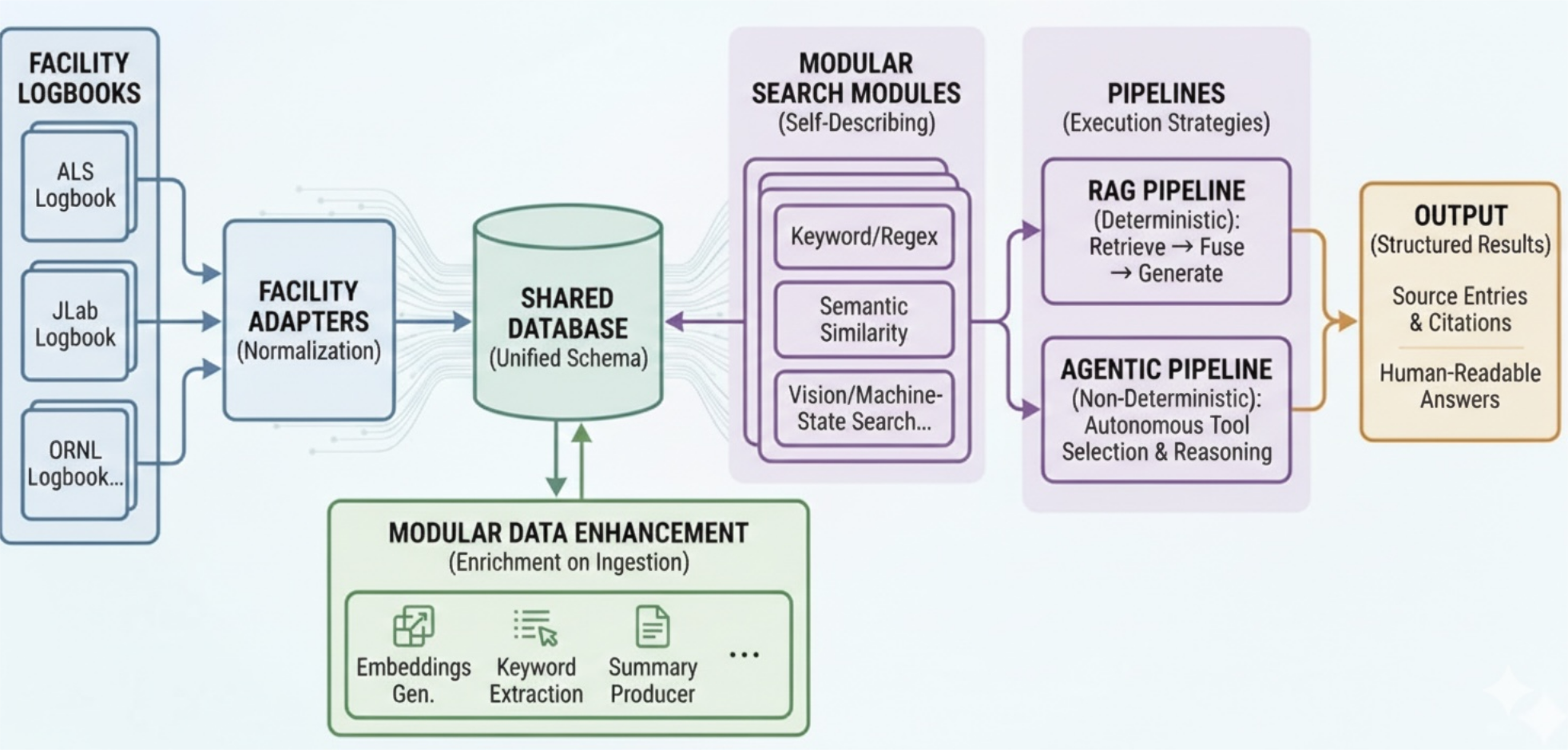
ARIEL data flow: facility logbooks are normalized through pluggable adapters into a shared PostgreSQL database, enhanced by modular processing stages, and queried through composable search modules.#
Prerequisites
ARIEL requires a working Osprey installation. Make sure you have the following ready before proceeding.
Python 3.11+ with a virtual environment
Osprey installed:
uv syncContainer runtime: Docker Desktop 4.0+ or Podman 4.0+ (for PostgreSQL)
LLM API access: An API key for your configured provider (e.g.,
ANTHROPIC_API_KEY)(Recommended) Ollama — for local text embeddings powering semantic search:
brew install ollama
ollama serve &            # Start Ollama in the background
ollama pull nomic-embed-text
curl -fsSL https://ollama.com/install.sh | sh
ollama serve &            # Start Ollama in the background
ollama pull nomic-embed-text
Ollama is optional. ARIEL degrades gracefully to keyword-only search if Ollama or pgvector is unavailable. You can install them later and re-run
osprey ariel quickstartto enable semantic search.
Quick Start
The easiest way to get started is to create a new project from the
ariel-standalone template, which includes ARIEL pre-configured:
osprey build my-project --preset ariel-standalone
cd my-project
This generates a ready-to-use config.yml with PostgreSQL, the ARIEL
web interface, and all search modules enabled — skip to Step 2.
Two commands bring everything up. The first run pulls container images, so it may take a few minutes depending on your internet connection.
Generate Docker Compose files from your config.yml, pull the
container images, and start them in the background:
osprey deploy up -d
Once the containers are running, connect to PostgreSQL, run database migrations, then ingest the demo logbook data and generate embeddings:
osprey ariel quickstart
Three ways to query the logbook:
Start the ARIEL web UI in a separate terminal, then open it in your browser.
osprey ariel web
Then open http://localhost:8085 in your browser.
Query the logbook service directly from the command line.
osprey ariel search "What happened with the RF cavity?"
Ask the Osprey agent. The logbook-search MCP tools connect the agent to the ARIEL search service, so it can combine logbook results with other context.
osprey claude chat
>>> What does the logbook say about the last RF cavity trip?
Learn More#
Facility adapters, enhancement pipeline, and database schema.
Keyword and semantic search modules and how to add your own.
MCP tools, service factory, and search result structure.
FastAPI app, frontend architecture, capabilities API, and REST endpoints.
The ariel-standalone preset: ARIEL without the control-system stack.
CLI Commands#
All ARIEL functionality is available through the osprey ariel command group:
Command |
Description |
|---|---|
|
Quick setup: migrate, ingest demo data, and enable search |
|
Show ARIEL service status |
|
Search the logbook ( |
|
Ingest logbook entries from a source file or URL |
|
Run ARIEL database migrations |
|
Sync database: migrate, incremental ingest, and enhance |
|
Watch a source for new logbook entries |
|
Run enhancement modules on entries |
|
List embedding models and their tables |
|
Re-embed entries with a new or existing model |
|
Launch the ARIEL web interface |
|
Purge all ARIEL data from the database |