Standalone Deployment#
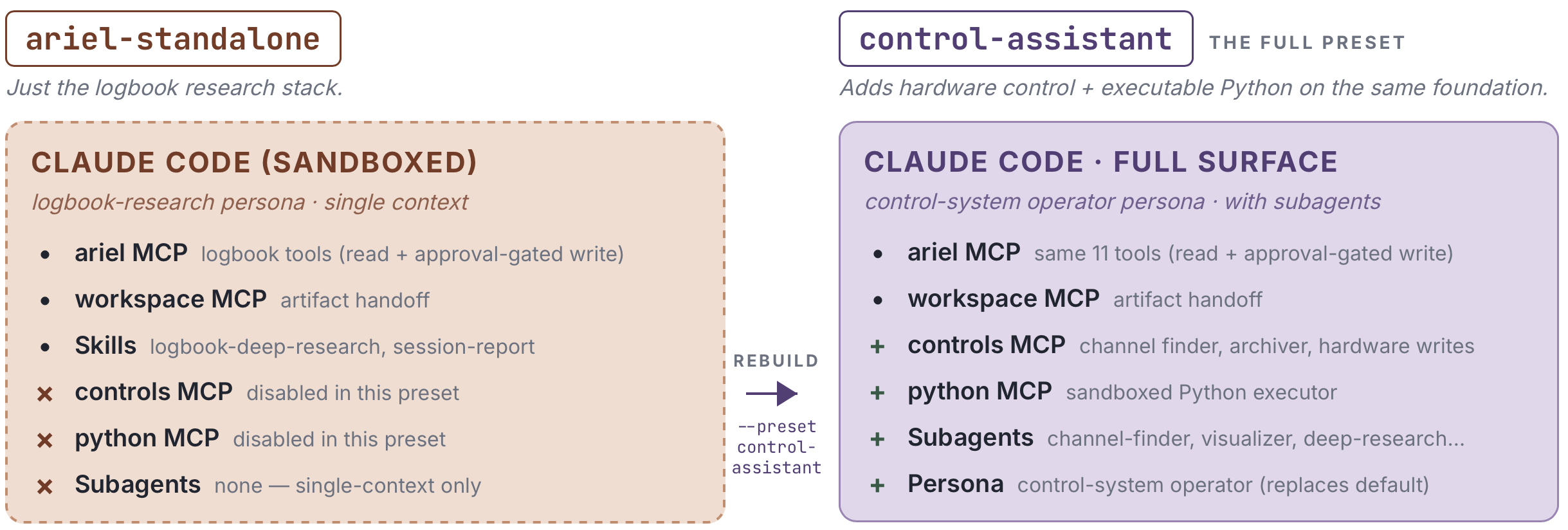
The ariel-standalone preset packages ARIEL together with a sandboxed
Osprey agent scoped to ARIEL’s MCP surface. There is no
control-system runtime, no shell, no filesystem writes, no Python executor.
Skills and plugins extend what the agent can reason about over your
logbook corpus; they cannot extend what it can touch on your host.
Use this preset when a facility wants ARIEL for logbook research but does not run an OSPREY control-assistant — for example, when hardware control is handled by a different system, or when a team wants to evaluate ARIEL on their corpus before committing to the full deployment.
Prerequisites
The standalone preset requires a working Osprey installation. Make sure you have the following ready before proceeding.
Python 3.11+ with a virtual environment
Osprey installed:
uv syncContainer runtime: Docker Desktop 4.0+ or Podman 4.0+ (for PostgreSQL and the web interface)
LLM API access: An API key for your configured provider (e.g.,
ANTHROPIC_API_KEY)(Recommended) Ollama — for local text embeddings powering semantic search:
brew install ollama
ollama serve &            # Start Ollama in the background
ollama pull nomic-embed-text
curl -fsSL https://ollama.com/install.sh | sh
ollama serve &            # Start Ollama in the background
ollama pull nomic-embed-text
Ollama is optional. ARIEL degrades gracefully to keyword-only search if Ollama or pgvector is unavailable. You can install them later and re-run
osprey ariel quickstartto enable semantic search.
Quick Start
Create a new project from the ariel-standalone preset. This
skeleton ships with Postgres+pgvector services, the ARIEL config,
and the sandboxed Osprey agent persona — no channel finder, no
archiver, no Python executor:
osprey build my-logbook --preset ariel-standalone
cd my-logbook
The generated config.yml enables keyword and semantic search
out of the box. Higher-level reasoning over results — multi-step
retrieval, answer synthesis, custom prompting — runs in the
sandboxed agent on top of these search modes (see
Search Modes).
Two commands bring everything up. The first run pulls container images, so it may take a few minutes depending on your internet connection.
Generate Docker Compose files from your config.yml, pull the
PostgreSQL+pgvector container image, and start it in the
background:
osprey deploy up -d
Once the container is running, run database migrations and ingest the bundled demo logbook with embeddings:
osprey ariel quickstart
Three ways to query the logbook:
Launch the web terminal. It hosts the ARIEL search panel
and an Osprey agent chat surface scoped to the ARIEL MCP
tools and the logbook-deep-research skill.
osprey web
Query the logbook service directly from the command line.
osprey ariel search "What happened with the RF cavity?"
Ask the sandboxed agent from a terminal REPL. The same
ARIEL MCP tools and logbook-deep-research skill are
available.
osprey claude chat
>>> What does the logbook say about the last RF cavity trip?
Customizing for your facility#
There are two customization paths, depending on how durable your changes need to be.
Quick edits (one-off tweaks)#
For small in-place adjustments to a project you just built, edit files directly:
Edit
.claude/rules/facility.md. The default ships with a thin placeholder for the “Example Research Facility (ERF)” — a facility-identity stub (name, type, mission) plus a pointer to thefacility_knowledgetools (list_concepts/read_concept/search) for deeper content. Replace this with your facility’s real terminology, system names, and naming conventions so the agent uses the right vocabulary when interpreting user questions.Note
.claude/rules/facility.mdis auto-registered as user-owned duringosprey build.osprey claude regenwill preserve your edits.Set provider credentials in ``.env`` (e.g.
ANTHROPIC_API_KEYorCBORG_API_KEY). The default provider isanthropic.Replace the demo logbook seed. The bundled
data/logbook_seed/demo_logbook.jsonis 28 entries of fictional accelerator events. Either:Replace the file with a dump from your real logbook (preserve the
generic_jsonschema), orEdit
ariel.ingestion.adapter/source_urlinconfig.ymlto point at your facility’s logbook system (see Data Ingestion).
Durable customization (a profile you own)#
For changes you want to keep across rebuilds — adding a custom skill,
overriding a rule, wiring up a real logbook — scaffold an editable build
profile that extends the ariel-standalone preset:
osprey build --emit-profile my-ariel-profile --preset ariel-standalone
This writes a my-ariel-profile/ directory with profile.yml (extending
the preset) plus overlays/{rules,skills,agents}/ sentinels. Edit
profile.yml to layer config overrides and overlay artifacts on top of the
preset, then rebuild whenever you change something:
osprey build my-ariel ./my-ariel-profile/profile.yml
The profile directory is your facility’s source of truth — commit it to your own repo. The rendered project is a regenerable artifact. See Build Profiles for the full schema and the preset → profile → project model.