Switch the Control Target at Run Time#
This page shows you how to move a running deployment between the machines it describes, without rebuilding the project or restarting anything. You can:
rehearse a piece of work on the virtual accelerator;
run it on the live machine;
rehearse the whole go-live procedure on a stand-in.
What You’ll Learn
The three control targets, and which machine each one names
The rehearse-then-run workflow, and the two tools it uses
What a deployment needs before a target can be selected
How to read the target roster, including what its reachability rows can and cannot prove
What the switch refuses, and what each refusal is asking you to do
How you can tell, at every step, which machine a call is about
What happens to Bluesky plans while the deployment is switched
Prerequisites: a deployment that describes more than one machine (see What a deployment needs first), and Use the Virtual Accelerator for the simulator itself.
The workflow#
The point of the switch is a rehearsal. You have a script, a set of writes or a plan that you would rather not try for the first time on the real machine. So you run it against the simulator, look at what it did, and then run it for real. You do this in one sitting, with the same tools, the same limits and the same approval prompts on both.
Three machines#
A control target names a machine, and OSPREY knows three of them. A deployment has the ones its config describes, which is often two:
Target |
Web Terminal label (default) |
The machine it names |
|---|---|---|
|
Live |
The facility’s own control system: the gateways written under
|
|
Simulator |
The virtual accelerator: a simulator this deployment stands up. It serves the same channel names, either from its container over real Channel Access or in this process (see Two venues). A write here moves nothing real. |
|
Rehearsal |
The live stand-in: a second soft IOC the deployment runs for itself,
configured from its own |
Two more terms run through this page:
Stand-in. Live stand-in, stand-in and Rehearsal all name the
standintarget. The build-profile keyvirtual_accelerator.live_standin: truedeploys it, andcontrol_system.type: live_standinmakes it the baseline.Baseline. The target a deployment starts on before anything has ever switched it, and the one it comes home to.
control_system.typesets it.
Note
One real machine per deployment. live names one machine, and the
connector blocks are keyed by connector type. So you cannot write a second
real machine into this config at all, such as the injector beside the ring
or a second complex’s control system.
A facility that operates two machines runs one deployment per machine. Each has its own targets, write posture, limits and archive, behind the same login origin if that is convenient. A config that does carry a second non-simulated connector block gets no target for it. The controls server’s log names the block that nothing reaches.
Two tools move between them:
control_targetReports where the deployment is pointed and where else it could go, with one row per target this deployment configures. It is read-only: it opens no connections and changes nothing. You can ask it at any moment, including before anything has ever been switched.
control_target_set(target)Moves the deployment.
targetisva,liveorstandin, spelled exactly. Where the deployment gates it on approval, as the shipped presets do, the prompt names the machine you would be moving to.
Ask the OSPREY agent for these in plain language: “what am I pointed at?”, “switch to the virtual accelerator”. Working on the simulator looks like working on the machine. Reads, writes, the python executor and notebook cells all follow the switch.
There is one control target per login, not one per conversation. A switch made anywhere moves everything: every chat and terminal window, every notebook kernel on its next cell, and the agent’s own tools. That is deliberate. A machine that one window can write to while another window shows something else is not a safety control.
In the Web Terminal you can also move the deployment yourself, without asking the agent. The control-target chip in the header opens a popover with a Switch to button per machine. It asks for the same switch, with the same gate, the same checks and the same refusal reasons. For a target the gate would refuse, the popover shows why in place of the button. See From the Web Terminal.
Whether writes may run follows the target too. Your write switch is per
machine and starts off on each. So a setpoint the simulator took is refused on
the real machine until you arm that machine from the chip
(Who May Write). Moving the deployment never arms a switch. To
check before you move, ask control_target: every row carries its own
writes_permitted.
The archive does not follow the switch. Archive reads:
keep the deployment’s one configured archiver;
answer only for the machines whose past it holds (see Rehearse on a stand-in live machine);
are stamped with the control target and the archiver that served them, so which machine a set of history is about is never ambiguous.
Rehearse on the virtual accelerator#
Start by asking where you are, then move to the simulator:
> what control target are we on?
> switch to the virtual accelerator
The switch starts the new connection before it retires the old one. It
proves the new connection by reading one channel through it: the target’s
probe_channel. Only when that read answers does the deployment move. A
switch that cannot prove the destination leaves you exactly where you were,
still working, with the reason reported.
Now do the work: run the script, make the writes, look at the results. Nothing about the tools changes; only the machine behind them does.
Go live#
A deployment baselined on the stand-in (control_system.type: live_standin)
starts on standin. There, going to the real machine is one tool call: the
same call, and the same prompts, as on a deployment that never had a stand-in
at all. The demo preset starts on the simulator (va) instead, so there
the stand-in is a switch of its own before the real machine.
Moving toward the live machine is the direction with the extra gates. Clearing them is the go-live procedure:
Read the roster before you ask for the switch, so you know what will happen:
> what control target are we on, and where else could we go?
Each row carries
available_now. When that isfalse, the row also carries thereasonthe switch itself would refuse with.Put your facility’s gateway addresses in
control_system.connector.epics.gateways. This clearsgateways_missing.Set
control_system.connector.epics.probe_channelto a channel your facility actually serves. This clearsprobe_channel_missing.Set
control_system.target_switch.live_gateway_acknowledgedto the hostname of the live gateway this deployment is configured against. This clearsoperator_ack_missing.Ask for the switch:
> switch to the live machine
The switch checks the gates in the order below and reports the first one that fails. The answer names the nearest thing to fix rather than the whole list.
A control system the switch can dial (connector_not_switchable).
The switch moves a session by pointing a connector host at a Channel Access
gateway. A deployment whose live block is on another protocol has nothing for
it to dial. The refusal names the connector type, rather than sending you to
author a gateways table your control system has no use for. It is not a fault
in the config, and it does not touch the machine. The deployment still runs on
that control system, and its own baseline is still where a session comes home
to. What the switch cannot do is move a session onto it.
The gateways (gateways_missing).
control_system.connector.epics.gateways names where the live machine is
reached. A facility’s gateways cannot be guessed, so nothing usable ships
here. The shipped templates differ:
The demo template leaves the whole block commented out. There this is the first gate, and the live target reads not configured until you author it.
The generic project template writes placeholder addresses instead. They pass this gate and fail the probe.
Either way, the edit is the same: put your facility’s gateway addresses in the block.
A probe channel (probe_channel_missing).
control_system.connector.epics.probe_channel names the channel the switch
reads to prove the machine answered, before the deployment moves onto it. It
ships commented out. A facility’s channel names cannot be guessed, and a
placeholder would make the live target look ready while naming a channel
nothing answers. Set it to a channel your facility actually serves.
An operator acknowledgment (operator_ack_missing).
control_system.target_switch.live_gateway_acknowledged must be set to the
hostname of the live gateway this deployment is configured against. By setting
it, you say “the gateways in this config really are my facility’s machine”.
Nothing infers that. The shipped example value looks like a real hostname, so
no check could tell an operator’s answer from a placeholder. This gate is the
live machine’s alone. For the stand-in, the line in the build profile that
stood the stand-in up said the same thing.
The archive is not a gate. The deployment’s own store is the virtual accelerator’s: the recorder samples the simulator and nothing else. The live machine and its stand-in share the facility’s archiver appliance. So no switch can put one machine’s readings into another machine’s past. See Rehearse on a stand-in live machine for whose history each target is shown.
There is one exemption. A deployment can always come home to its own baseline, whichever of the three that is, with none of the gates above applied. That covers the acknowledgment and the gateway and probe-channel checks.
Stranding a deployment away from the machine it was built for is the less safe outcome of the two. Without the exemption, a half-authored baseline would be a machine that a session can leave and never come back to. Half-authored means no gateways yet, the probe channel still commented out, or a machine reached over something other than Channel Access. Where the baseline names a probe channel, the return is proven with it like any other switch. Where it does not, the return is made unprobed and the controls server’s log says so.
Three things still refuse, coming home as much as going out:
a target that resolves to no
control_system.connectorblock at all;a
standinblock pointed at something other than the stand-in this deployment runs;a baseline whose connector block derives no endpoint at all. It publishes no reachability row. So while a controls server is live, it is still refused as
reachability_unknown: the switch gate’s reachability rung is direction-blind and has nothing to read.
None of the three is a machine the switch can prove it came home to.
Coming home#
Ask for the baseline and the switch runs like any other, under the exemption above.
Nothing else brings a deployment home. The control target and each login’s
write switches are recorded on the deployment’s durable volume. They outlive
the conversation that set them, a controls server restarting, and
osprey down && osprey up. A fresh server adopts the recorded target rather
than resetting it. A deployment somebody left on the real machine yesterday is
still on the real machine today, so read the chip before you start work.
From the Web Terminal#
You can also do everything above by hand, without a prompt. Click the control-target chip at the top of the sidebar. The popover lists every machine this deployment configures: the one the agent stands on as a card, and every other one as a row.
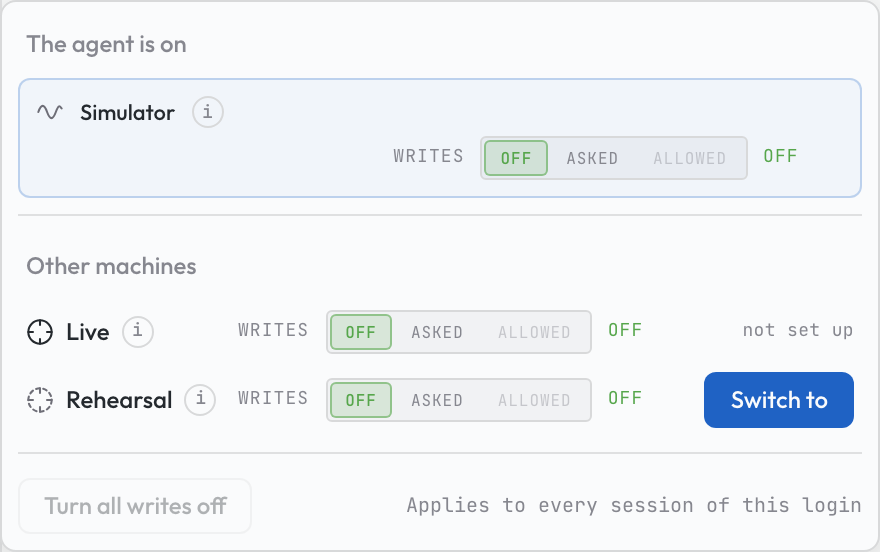
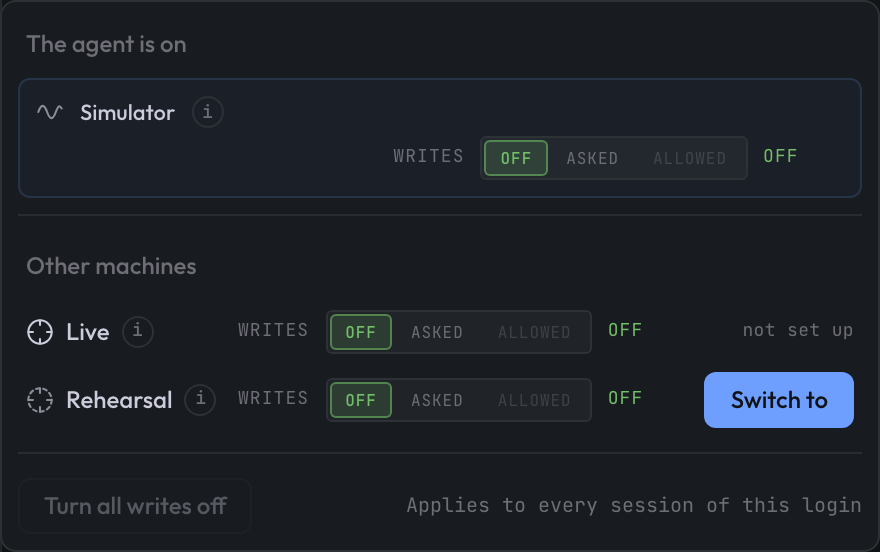
The popover on the tutorial deployment, whose baseline is the simulator: the
Simulator card, Live still not set up, and Rehearsal a Switch to
away. Captured with OSPREY v2026.9.0b3.post6984+ge42fbe736.d20261111.
Each machine carries:
A writes switch. One widget shows your login’s switch for that machine and changes it: off, asked or allowed. Narrowing applies as you click, and nothing refuses it. Widening asks first. A position your tier or a lock forbids is disabled, with the reason on hover.
A small ⓘ after the name. On hover or keyboard focus it shows what writing to this machine means (Writes move hardware, or one of the nothing moves lines). It also shows the endpoint and the controls server’s own technical label.
Switch to. A confirmation names where every control read and write goes next, and the write state the deployment arrives in. The row reads
switching…until every one of the deployment’s control-system servers has moved onto the new machine. Then the outcome lands on the row:✓ switched, or✗with an operator phrase for the same refusal code the agent is given. The gate’s own sentence is on the tooltip. A server that could not make the move is named, so you know which one to look at. The outcome line leaves the row after a minute.
Turn all writes off, at the foot of the popover, turns every switch of your login off in one click. It stops your login’s writes only; other logins keep theirs. A switch belongs to one login: two logins on one machine never change each other’s writes. Run the Web Terminal walks the whole surface, including what the chip cannot lift and who can.
One process holds the deployment’s control context at a time, and only that process moves the deployment. A second web terminal of the same login moves write switches as the first does. In place of its Switch to buttons, it shows a phrase naming the holder.
What a deployment needs first#
A deployment can only be moved to a target its config describes. Each target reads its settings from a connector block of its own. A target with no block is not offered at all. It has no roster row, rather than a row saying that a machine nobody deployed is unavailable.
Target |
Its connector block |
|---|---|
|
|
|
|
|
|
A deployment serving the simulator in process is switchable like any simulator
deployment. With a live or standin block in its config, it moves
between the in-process va and those targets the same way.
One key is not filled in for you. Each target names a probe_channel: the
channel the switch reads to prove that target is reachable.
Target |
|
|---|---|
|
Shipped set to a channel the demo facility serves. The build stops while it names a channel the facility file does not hold, so an imported facility replaces it with one of its own readbacks. |
|
Shipped commented out. A facility’s channel names cannot be guessed, and a placeholder here would make the live target look ready while naming a channel nothing answers. |
|
Copied from the simulator’s. The stand-in is the same soft IOC over the same machine model, so the channel that proves one proves the other. A deployment whose simulator names none gets none here either. |
A target with no probe_channel is never switched to, and the roster says
so by name. The one exception is the deployment’s own baseline: the
deployment comes home to it unprobed rather than making it unreachable. So
naming the live machine’s probe channel is a deliberate act by whoever knows
the facility. It is the same posture as the acknowledgment key above.
Three more keys, all under control_system.target_switch:, bound the switch
itself:
Key |
Default |
What it bounds |
|---|---|---|
|
5 |
How long the new connection gets to read the target’s
|
|
5 |
How long work already in flight gets to finish on the old target before
it is torn down regardless. |
|
30 |
How often the background reachability check runs. |
Note
Changing the target is not a config change and not a rebuild.
control_system.type only sets the deployment’s baseline: the target it
starts on before anything has ever switched it, and the one it comes home
to. The agent’s own setup guidance carries the same rule in its hot/cold
settings table. Target changes go through control_target_set. Nobody
should be sent to osprey build to change which machine a deployment is
talking to.
Reading the roster#
control_target answers with one row per target. The row says what the
target is, and whether the deployment may move there right now. Where
something has actually measured it, the row also says whether its gateway
answered.
What the row carries |
What it means |
|---|---|
|
Whether the deployment may switch there at this moment, and if not, why not. The reason is the same word the switch itself would refuse with, so the two can never tell you different stories. |
|
The same question, asked as if the deployment sat on its own baseline.
This is the static view, unaffected by where the deployment happens to
be. Take a live-baseline deployment with no acknowledgment set,
currently on the simulator. This field reads |
|
One entry per configured gateway role ( |
|
The background check’s last observation of that gateway, and when it made
it. A row older than three probe intervals is marked |
|
Whether writes are permitted on this target, whether this target is the real machine, and the channel a switch would prove it with. Two rows of the same deployment can disagree about the first one: the switch is per machine, so the simulator may be armed beside a real machine that is off. |
|
Whether this target runs exclusive limits: limits checking on and
|
The roster is careful about two things. They make it a report you can act on, rather than one that flatters you:
It is correct before anything has been switched. A target nobody has ever activated is judged from configuration alone, so the roster is useful as a first question rather than only as an after-the-fact record.
A reachability row is not offered where nothing measured one. If no
measurement exists, the row carries no endpoint_tcp. “Not measured” and
“measured as down” are different claims, and they are never spelled the same
way.
Important
The honest limit of the reachability check. A gateway reached by
address list rather than by name server reports not_applicable, not a
status. In that mode, Channel Access (the EPICS protocol OSPREY speaks)
finds channels by UDP broadcast. A TCP probe proves only that something is
listening on a socket, not that a channel search would be answered.
Reporting it as “up” would be a guess presented as a measurement.
On a stock EPICS deployment, that is exactly the live machine’s situation. It has no continuous liveness row. Its only real evidence is the probe the switch performs: a real read of a real channel, through the connection the switch is about to hand you. That probe is why the switch is trustworthy even where the background check has nothing to say.
What the switch refuses, and why#
Every refusal names one thing you can act on. Refusals are reported in a fixed order, from “this deployment may never switch” to “this destination is not usable right now”.
What you will see |
What it means |
|---|---|
This run is read-only |
The deployment was started in read-only mode, which is a claim about the whole run. A switch changes control-system state, so a read-only deployment stays on its baseline. Re-run without read-only mode. |
An execution is in flight |
A python execution or a notebook cell is running, and it was launched against the target it started on. Wait for it to finish or stop it, then switch. The refusal names which target the running work is on and who is holding it: this session, another session, or a notebook kernel with interrupt that kernel as the remedy. So you know what to stop rather than what to wait for. Asked from the chip, the refusal names a notebook kernel by the notebook it is running. Asked through the agent’s own tool, it names the kernel by its kernel id, which JupyterLab shows beside the running kernel. |
A switch is already in progress |
An earlier switch has not yet reached every control-system server. The refusal names the servers still working. Wait for the chip to settle and ask again. The request is refused rather than queued, so nothing lands later without you. A server that has not launched a connector yet is not one of them. It has nothing to move off, so it holds up nobody else. |
Already there |
The deployment is on that target already. The active target always answers this, whatever else would also be true of it. |
Switching not supported |
The target’s connector type is not reached over Channel Access, and the switch has no way to dial it. Nothing is missing from the config, and the deployment still runs on that control system. A session cannot be moved onto it. |
The target is not configured |
No connector block for that target, no gateways table, or no entry for the gateway role this deployment would select. This is a build or config gap, not something a switch can resolve. |
No probe channel |
The target names no |
The stand-in is not this deployment’s |
|
A simulated present with an invented past |
The switch refuses to move to a machine that this deployment stands up for itself and serves over the network, while the deployment’s archiver is the mock one. Those machines are the virtual accelerator from its container, and the stand-in. The mock archiver makes history up at read time. The pairing would put a made-up past next to a modelled present, with nothing linking them. See “The honesty rule” in Use the Virtual Accelerator. |
The live machine’s gate |
The operator acknowledgment, the live machine’s alone. See Go live. |
Two more refusals arrive after a switch rather than instead of one. Both exist for the same reason: something was approved for one machine, and it must not quietly land on another.
A write approved before the switch. Every write carries the target and the generation it was approved under. The generation is a counter that every switch advances, so even a round trip back to the same target retires older approvals. The write refuses if either one moved before it executed. Nothing is written. Ask for the write again on the target you actually mean.
A python execution that outlived the switch. A running script keeps the target it was launched with. Once the deployment moves past that point, the script’s writes refuse rather than being redirected. A notebook cell refuses the same way and says to re-run the cell, because a kernel re-reads the target before every cell (Notebooks).
Finally, two surfaces stay deliberately pinned to the deployment baseline while the deployment is switched. They say so rather than following along:
Driving a Phoebus widget is refused.
osprey healthkeeps reporting against the baseline, with an added line naming the targets.
Both talk to the deployment’s own configured stack, which a switch does not move.
Failures name the machine they happened on#
On a deployment with more than one target, “the read of SR:...:RB timed
out” means something very different on the live machine than on the
simulator. So every control-system failure envelope names the target the
deployment was pointed at when it failed. That covers a connect failure, a
timeout, a limits refusal, and a write the control system itself denied. The
envelope carries:
a human clause in the message (
active target: Live — writes move hardware at 10.0.0.5:5064);a machine-readable
details.active_targetblock carrying the target name, its label, and the endpoint where the configuration knows one.
The agent narrating a failure, and any script asserting on one, can attribute it to the right machine from the payload alone. Neither has to reconstruct the answer from memory.
Knowing which machine you are on#
OSPREY tells you which machine you are on at every step:
Every approval prompt names the target, not only the write prompts. A queue start, a patch or an execution all carry the line too, so you never learn to read its absence as safe. The prompt names:
the live machine as
Live — writes move hardware, with the gateway the deployment actually holds;the stand-in as
Rehearsal — nothing moves;the simulator as
virtual accelerator (simulation).
If the target cannot be read at all, the line says so explicitly instead of disappearing. The web terminal names the same machines by what they are (Live, Rehearsal, Simulator, or the deployment’s own configured names) and keeps these technical labels on its tooltips.
Results and artifacts are stamped. Archive reads carry the control target and the archiver that served them, so a saved plot still says what it is about a week later.
The target is visible in the Web Terminal. It shows in the activity stream as work happens. It also shows on the control-target chip in the header, which names the machine the deployment stands on and the write state on that machine:
● Simulator · writes allowed,● Live · writes locked. The write state is per machine, so a deployment can arm its simulator and leave the live machine read-only. The chip is where that shows.The terminal tells the chip when the record moves. So the chip repaints as soon as a switch lands, whoever made it and in whichever window. It falls back to the deployment’s default target when none can be resolved.
The choice outlives the conversation, so read it before you work. The target is recorded on the deployment’s durable volume, and a restart adopts it rather than resetting it. A deployment can be sitting on the real machine when you open it. Check the chip, and remember that coming home is a switch like any other.
Bluesky plans while switched#
A Bluesky plan lane is a whole plan stack (bridge, queue manager, worker) wired at build time to one target. Every deployment renders one.
By default every deployment has a single lane. On a single-lane deployment, queueing or starting a plan is refused while the deployment is pointed somewhere the lane does not serve. The refusal says which target the lane serves. It also says that adding a second lane is a deployment change rather than something to retry.
Setting bluesky.second_lane: true in the build profile renders a second
complete lane. Which machine each lane serves is derived, never authored:
The first lane serves the deployment’s baseline.
The second lane covers the other machine of interest. A
liveorstandinbaseline gets avalane, and avabaseline gets alivelane.
A standin lane dials the co-deployed soft IOC by name, so there is nothing
for you to supply. A live lane always dials the facility’s own gateway
through EPICS_CA_NAME_SERVERS. osprey up refuses to start rather than
let that lane come up searching for channels at nowhere.
With two lanes, the switch stops being a refusal and becomes an address:
A plan is routed to the lane serving the deployment’s target.
queue_addreports the lane it bound the plan to.queue_startmust name that lane. So a plan composed for the simulator cannot be started on the machine because the deployment moved in between.
Switching moves which lane is addressed. It does not restart any lane’s containers. See Bluesky Plans for the plan stack itself.
The BLUESKY panel follows the same two-lane deployment with a picker of its own. It does not follow the control target: you choose which lane the panel shows, in the panel. The lane picker in the panel’s toolbar shows which machine it is pointed at, labelled by target. Switching lanes there reloads the panel onto the other lane’s bridge. Its plans, shared draft, queue and results all move together, and starting the queue uses that lane’s own launch token. A single-lane deployment shows no picker, and nothing about its panel changes.
Rehearse on a stand-in live machine#
A generated project describes a simulator and a facility gateway. But the
gateway may not exist yet, or not be reachable from this laptop, so you cannot
try the live half of this page at all. A live stand-in gives you
something to rehearse the procedure on. It is a second soft IOC the deployment
runs for itself, deployed as a third control target of its own.
Setting virtual_accelerator.live_standin: true in the build profile deploys
it, and the demo preset ships that line on. From it, the build derives the
stand-in’s own control_system.connector.live_standin block and nothing
else: where the stand-in listens, and what proves it reachable. The epics
block beside it is untouched. So a facility already pointed at its own control
system can stand a rehearsal up next to it, without losing sight of its
machine.
Limits are the profile’s to state. Limits are optional, and the limits
pair lives in the profile’s config: block. The stand-in gets no block of
its own, so it runs the deployment-wide pair:
config:
  control_system.limits_checking.enabled: true
  control_system.limits_checking.mode: optional
mode: exclusive means only channels in the limits file can be written.
mode: optional means channels in the file are held to their limits, and
every other channel is written with no limits. enabled: false means no
limits at all. A control_system.connector.<type>.limits_checking block
replaces the pair above for that type alone. It must state both settings, or
osprey build and osprey validate refuse it.
Three rows on the roster. Ask where the deployment could go and you get one row per configured machine:
> what control target are we on, and where else could we go?
> switch to the stand-in
control_target_set standin moves the deployment the same way every other
switch does: the probe, the approval prompt, and the write posture that follows
the target. From there, control_target_set live walks the real go-live
path (Go live) against a machine that cannot move a magnet.
Start there rather than switch there. osprey set connector=live_standin
writes control_system.type: live_standin into the profile. From the next
osprey build, the deployment starts on the stand-in. Use this posture for
a deployment that is not yet wired to its facility, or whose machine is down.
Flipping it back takes three settings, not one, because the archive goes with
the machine. The va_archiver: block is the virtual accelerator’s store: the
simulator’s seeded and recorded history. The build refuses to serve a
simulated store as the facility’s past. So in the same step, you drop the
store and point the archiver at the one that records the facility’s machine:
osprey set connector=epics                      # your control system
osprey set config.archiver.type=epics_archiver  # the archiver that records it
osprey set va_archiver=null
epics stands for your control system; see Use Connectors for the
others and their archivers.
osprey init does not offer the stand-in. The build refuses
control_system.type: live_standin on a profile that asks for no
virtual_accelerator.live_standin. Both would name a machine the deployment
does not run.
The label stays honest. Nothing calls the stand-in the live machine. The
banner reads Rehearsal — nothing moves, and the roster says the same. The
control-target chip in the web terminal’s sidebar reads Rehearsal, named for
what the stand-in is for, with the technical label kept on its ⓘ tooltip. The
stand-in carries a real machine’s posture (the same limits, the same approval
prompts) because it is operated as one, not because a write reaches the
facility. What the stand-in rehearses is the procedure, not the risk.
Telling the two machines apart. Both run one image over one simulator view, and the stand-in carries no errors of its own. You can tell them apart in two ways:
A write to the sandbox does not show on the stand-in.
The model RPC status names its instance (
virtual_acceleratororlive_standin).
The archive belongs to the machine. The stand-in rehearses your real machine, so the past it is shown is the real machine’s:
the
epics_archiverappliance when the deployment names one (amya_archiverordoocs_archiverblock is the facility’s archive in the same way);no archive otherwise.
It is never shown the simulator’s store. That store stays the virtual
accelerator’s: the recorder samples the simulator, and the history seeded on
the first deploy is the simulator’s own. So a trend read on the stand-in and
one read on the live machine come from one archive, the way a rehearsal
should. osprey sim apply reaches both machines: a scenario changes the
world, not one lane.
On a laptop the second container is a real cost: a second simulator runs for the life of the deployment. Delete the line when the rehearsal is over.
See also
Use the Virtual Accelerator — the simulator itself, the archive it deploys, and the one configuration the stack refuses.
The virtual_accelerator block — the build-profile keys behind the simulator and the stand-in.
Python Executor — how executions are launched, and what the target stamp pins them to.
Bluesky Plans — the plan stack that plan lanes belong to.